Claude and fish: my custom git workflow
9 min read
Do you remember when we used to write code by hand? I mean, like actually typing the code yourself.
I know I will tell that story to my kid sometime in the future and he will not buy it. But anyway, I still write code, sometimes, and when I do, I still want an LLM-generated conventional-commit message.
That’s usually a single message to Claude “give me a conventional commit message for this diff”, which I have later converted to a skill. This allows me to tune some nuances around when to use chore vs build, etc.,
However, even the use of the skill became a bit tedious, so I wrote a small set of fish functions for git that I use daily.
These are ac, ghpr and gitm.
I have them released as a fisher plugin, check out the repo!
Once you have fisher installed, adding the functions is as easy as doing
fisher install Guernik/fish-ai-git@<check latest tag below>I recommend pinning the the version tag, since that’s the signed release.
Latest version is

However, you will have to manually uninstall and install a new version for each release.
If you want to update with a single command, you need to install from HEAD:
fisher install Guernik/fish-ai-gitThen for the update:
fisher update Guernik/fish-ai-gitWhat they do?
ac: stage all your changes, send a diff to the llm, and receive a conventional commit message.
ghpr: send a PR with your changes and set relevant title and description.
gitm: no LLM involved, just checkout main, pull your merged PR, and delete the merged branch.
LLM prompts:
This took a bit of trial and error. Most pain came from the fact that there is no guarantee that the LLM will return only what you ask for, even if you are very explicit about it.
For instance, many times the commit message had wrapper comments like “Here is the commit message:…”, which was incorrect.
I think the correct solution is to use json mode on the claude CLI, which allows to set a schema:
git diff --cached | claude -p --model haiku \ --json-schema '{ "type": "object", "properties": { "message": {"type": "string"} }, "required": ["message"], "additionalProperties": false }' \ "Write a git commit message for this staged diff, following Conventional Commits. Include a body paragraph and a 'Changes:' bullet list. Put ONLY the raw commit message in the message field."However, that comes with a trade-off: the output text is a json string, which means that we now have to un-escape newlines, backsalsh, quotes, apostrophes, and indentations. Doing this without a dependency (like jq) takes even more effort that the simple ~40 lines sanitizer that claude wrote. So I decided to keep the normal, prose prompt style:
Write a single git commit message for the following staged diff, strictly following the Conventional Commits 1.0.0 spec AND the project's required structure.
Required structure (in this exact order):1. Header line: <type>[optional scope]: <description>2. Blank line3. Main description paragraph: 1–3 sentences explaining what changed and why, wrapped at ~72 chars.4. Blank line5. A 'Changes:' section listing the concrete changes as bullets starting with '- ', wrapped at ~72 chars (continuation lines may be unindented).
27 collapsed lines
Example of the exact required shape:
ci: migrate secrets management from ansible-vault to infisical
Replace ansible-vault encrypted files with Infisical for centralized secretsmanagement. Secrets are now injected as environment variables via \`infisical run\`wrapper in the justfile, eliminating the need for vault passwords in CI andsimplifying local development.
Changes:- Remove vault file exclusions from linting configs (ansible-lint, pre-commit,yamlfmt, yamllint)- Add \`.infisical.json\` project configuration- Replace all vault-encrypted files with env var lookups in vars files- Update justfile to wrap playbook invocations with \`infisical run\`- Add \`infisical-setup\` and \`infisical-secrets\` recipes for setup and debugging- Remove orphaned zsh setup tasks (atuin, path, pipx, tokens)- Fix setup-playbook.yml to safely default ansible_user_name
Rules:- type is one of: feat, fix, docs, style, refactor, perf, test, build, ci, chore, revert.- Use a scope in parentheses when it clarifies the affected area.- Header description: imperative mood, lower case, no trailing period, max 72 chars.- The main description paragraph and the 'Changes:' section are REQUIRED — always include both, even for small changes.- Use '!' after the type/scope and/or a 'BREAKING CHANGE:' footer for breaking changes.- Use real blank lines between sections (actual newline characters, not the two characters backslash-n).- Do not be too verbose while listing simple changes. For instance 'Update svg2fcm draft header from "#### wip!" to "## Draft" for clarity' is bad. 'Update svg2fcm draft header' is good.- Output ONLY the raw commit message. Do not wrap it in a code fence, do not add quotes around it, and do not write any preamble or commentary before or after it."The ghpr prompt has a similar structure.
Project setup and repo hygiene
I like setting up my projects with good industry standard practices.
In this case we have:
1. pre-commit hooks
end-of-file-fixertrailing-whitespacecheck-merge-conflict- And the local checks:
fish-lint,fish-audit, andfish-test
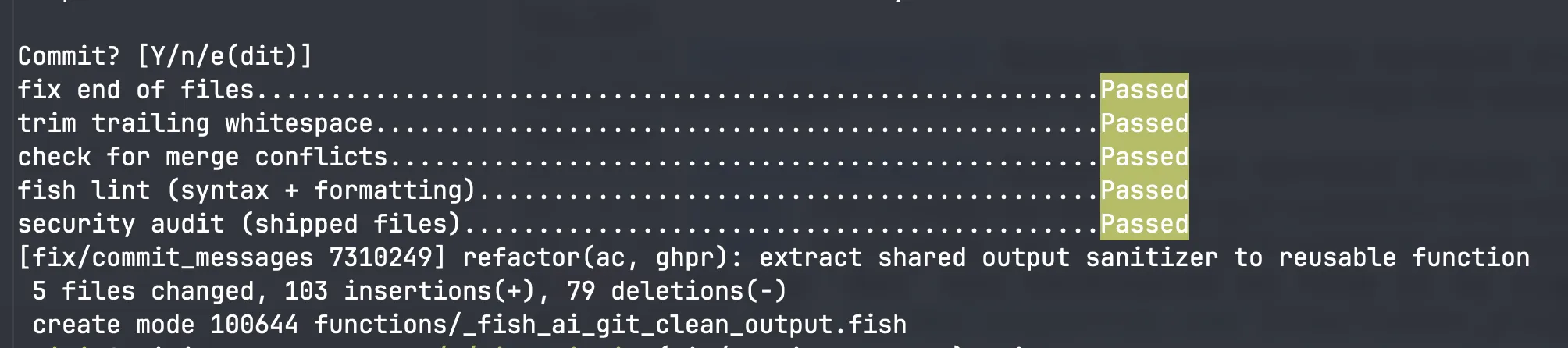
2. Unit tests
Thanks to fishtape, (available as a fisher plugin), we have some decent coverage:
emilio@Emilios-MacBook-Pro ~/p/fish_functions (main)> just testTAP version 13ok 1 ac bails when there is nothing to commitok 2 ac reports nothing to commitok 3 ac commits with the model's message subjectok 4 ac sends the real source change to the modelok 5 ac excludes lockfile content from the model prompt...ok 46 gitm -h prints usage
1..46# pass 46# ok3. CI/CD
lint-and-test and audit checks are provided on the ci.yml workflow file

The release is handled by the release.yml workflow, activated upon a newly pushed tag.
The job will check that the tag was signed and generates a new GitHub release (look at the v1.0.0 release for an example job run)
4. Security
Since this project install code that runs on your machine, checking out git branches, and calling and external LLM, some security considerations have been made. You can read more about that on the repos SECURITY page Basically all tags and releases are signed by my personal singing key (which you can verify locally). Releases are blocked if the tag is not sign.
Dependabot and code attestation have also been considered, but discarded at the moment (no dependencies to update, and no artifacts to sign).
Functions logic
ac (for AutoCommit)
How it works
flowchart LR
    A[git add -A] --> B[Build diff<br/>exclude noisy files] --> C([<strong>claude -p<br/>generate message</strong>]) --> D[Show + prompt] --> E[git commit]
    classDef ai fill:#4AAE47,stroke:#2f7a2d,color:#fff;
    class C ai;
Example
Help text:
emilio@emilio ~/ (main)> ac --helpusage: ac [-h|--help]
Stage all changes (git add -A) and commit with an AI-generatedConventional Commit message. Shows the message and prompts beforecommitting: [Y] commit, [e] edit in $EDITOR, [n] abort (changesstay staged).
The model defaults to $AC_MODEL (haiku). Noisy/generated files(lockfiles, minified assets, dist/, build/, snapshots) are hiddenfrom the diff sent to the model, but every staged file is committed.Usage example:
emilio@emilio ~/p/fish_functions (docs/mermaid-diagrams)> acGenerating commit message…
docs: reorganize README sections and add mermaid flow diagrams
Restructured the README to improve clarity and readability by moving theRequirements section before Functions and relocating the `ac` and `ghpr` flowdiagrams into a dedicated Functions subsection.
Changes:- Add Requirements section with dependencies: fish ≥ 3.6, claude, gh, and git- Move Requirements section before the Functions section- Create `ac` flow and `ghpr` flow subsections with mermaid diagrams- Relocate flow diagrams from "How `ac` and `ghpr` work" section into functionsubsections- Remove "How `ac` and `ghpr` work" heading (content now integrated intofunction flow subsections)
Commit? [Y/n/e(dit)]It’s not perfect though! For instance, look at this commit
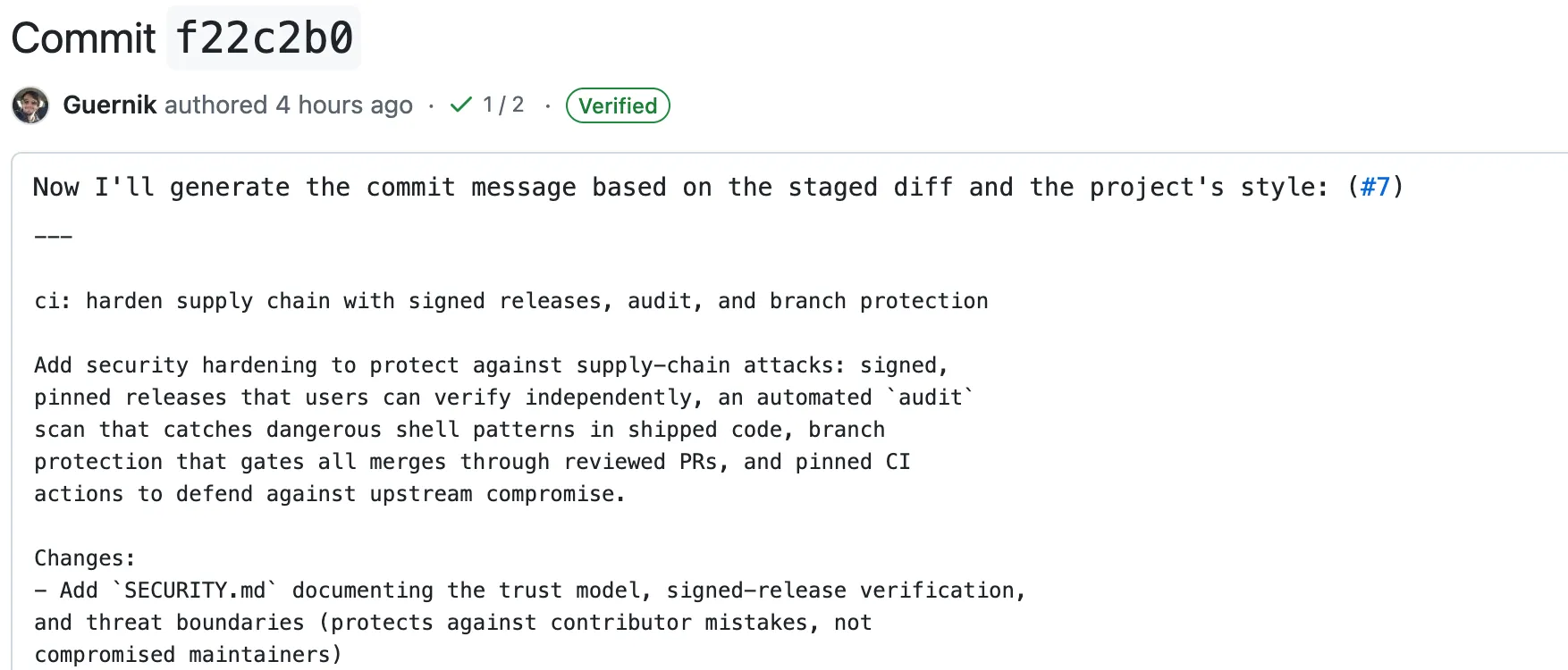 Some LLM related context got to the commit message. (Commit title should have been
 ci: harden supply chain with signed releases...)
In my defense, I did set up the e(dit) positivity to always have the last word, but this one slipped away!
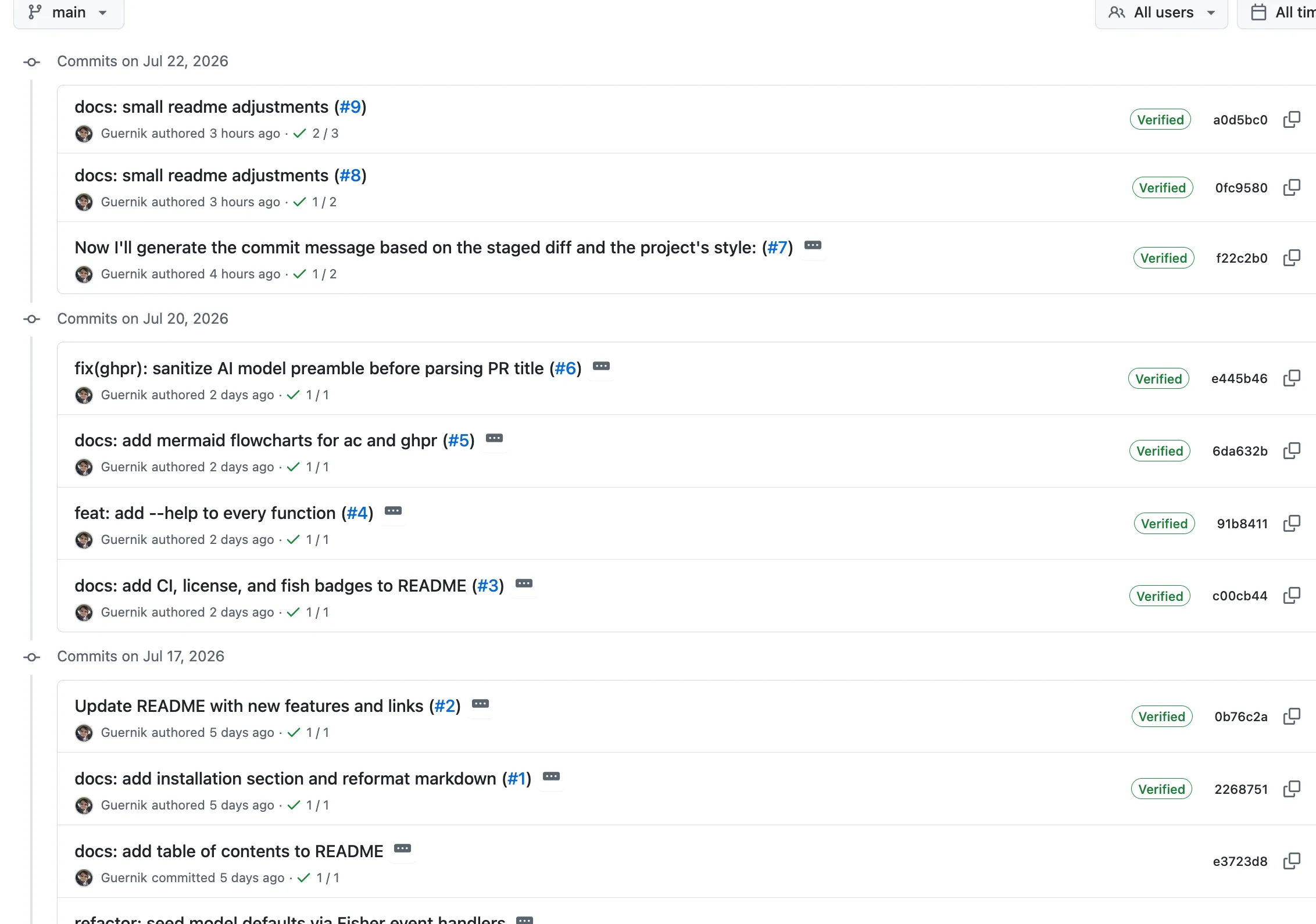
(It does look ugly, but I will not rewrite the history of the repo for a small commit message mistake).
The rest of the commits are good though
ghpr (for GitHub Pull Request)
ghpr pushes the current branch and opens a GitHub PR with an AI-generated title and body. It detects the base branch automatically, so most of the time it’s a single command.
How it works
flowchart LR
    A[ghpr] --> B[git push] --> C([<strong>claude -p<br/>PR title + body</strong>]) --> D[gh pr create]
    classDef ai fill:#4AAE47,stroke:#2f7a2d,color:#fff;
    class C ai;
Example
emilio@Emilios-MacBook-Pro ~/p/fish_functions (docs/mermaid-diagrams)> ghpr# → pushes the branch and opens a PR with an AI title + bodyPush 'docs/mermaid-diagrams' and open PR against 'main'? [Y/n/w(eb)]Same idea as ac: accept (Y), reject (n), or hit w to open the browser with the PR pre-filled instead of creating it directly.
gitm (for Git Merge cleanup)
gitm is the tidy-up step after a PR gets merged. It switches to the repo’s default branch, pulls, and deletes the branch you just left — but only if it’s already merged, so unmerged work is never dropped.
How it works
flowchart LR
    A[gitm] --> B[git switch default] --> C[git pull] --> D{branch merged?} -->|yes| E[git branch -d] --> F[done]
    D -->|no| F
Example
emilio@Emilios-MacBook-Pro ~/p/fish_functions (docs/mermaid-diagrams)> gitm# → back on main, pulled, and the merged feature branch cleaned upTogether, ac, ghpr and gitm cover the whole loop — commit, open the PR, and clean up once it’s merged — without ever leaving the terminal or hand-writing a message.
Configuration
By default, ac and ghpr use the AC_MODEL and GHPR_MODEL universal variables, set to haiku on install.
Since I’m mostly using Claude as my primary coding agent/LLM, I didn’t set up any means to configure other providers.
Further improvements
fish-ai is another fish plugin that aims to incorporate AI into the shell in a more deep, involved manner.
Even when such a setup is a bit too much for me (it actually uses a python backend each time you call the plugin), the configuration mechanism they provide is interesting, particularly the OpenRouter and local LLM setup.
As a further improvement of my functions, I could provide some similar configuration options. Better yet, feel free to fork and open a PR!